This test now makes sure that:

1. If a glob is used, and it contains `**`, then it should _not_ resolve
   ignored files/folders like `node_modules`.
2. If an explicit glob is used that contains `node_modules`, then we
   will resolve files in this folder.
3. If an explicit glob is used, and that glob includes file extensions
   we normally ignore then those files should resolve because the glob
   is explicit.
Now that we can promote `@source "../path/to/folder"` to enable auto
source detection, it means that we can just merge the globs together and
add the base folder as if it was `@source "../path/to/folder"`
This PR updates all of our x/y named utilities (like `px-*`, `my-*`,
`inset-y-*`, `scroll-px-*`, etc.) to use logical properties like
`padding-inline` instead of separate `padding-left` and `padding-right`
properties.

We held off on this originally for a while because `inline` doesn't
really mean _horizontal_ like the "x" in `px-*` implies, but I think in
practice this change is fine — I'm comfortable with "x" meaning "in the
inline direction" and "y" meaning "in the block direction" in Tailwind.

This is technically a breaking change if anyone was depending on the
fact that `px-*` for instance was always explicitly setting
`padding-left` and `padding-right` even when building something in a
vertical writing mode, but I kinda doubt there's a single real project
on the internet that will actually be affected, so not too worried about
it.

If someone _really_ wants to set `padding-left` and `padding-right` they
can always use `pl-4 pr-4` instead of `px-4`.

Nice thing about this change is it produces quite a bit less CSS.

To test this change, I re-generated all of the snapshots and made sure
none of the generated utilities changed position or anything in the
output (initially they did before I updated `property-order.ts` to add
some missing properties).

I also created a little demo locally in the Vite playground to test
things manually and make sure I didn't make any obvious typos or
anything that could slip through the snapshots:

<img width="1223" alt="image"
src="https://github.com/user-attachments/assets/0e9854ba-2b5b-4c8c-87b6-6eb7b7da84f2">

<details>
<summary>Show code for playground demo</summary>

```jsx
import React from 'react'

export function App() {
  return (
    <div className="p-12 gap-10 grid grid-cols-2 items-start">
      <div className="grid grid-cols-1 gap-10 justify-start">
        <div className="space-y-6">
          <p className="font-semibold mb-6">Border Width</p>
          <div className="border-x w-48 h-12 flex items-center justify-center">border-x</div>
          <div className="border-y w-48 h-12 flex items-center justify-center">border-y</div>
        </div>
        <div className="space-y-6">
          <p className="font-semibold mb-6">Border Color</p>
          <div className="border-2 border-x-red-500 w-48 h-12 flex items-center justify-center">
            border-x-red-500
          </div>
          <div className="border-2 border-y-red-500 w-48 h-12 flex items-center justify-center">
            border-y-red-500
          </div>
        </div>
        <div className="space-y-6">
          <p className="font-semibold mb-6">Padding</p>
          <div>
            <div className="px-8 bg-yellow-300 inline-flex items-center justify-center">px-8</div>
          </div>
          <div>
            <div className="py-8 bg-yellow-300 inline-flex items-center justify-center">py-8</div>
          </div>
        </div>
      </div>
      <div className="grid grid-cols-1 gap-10 justify-start">
        <div className="space-y-6">
          <p className="font-semibold mb-6">Margin</p>
          <div>
            <div className="bg-red-400 inline-flex">
              <div className="mx-8 bg-yellow-300 inline-flex items-center justify-center">mx-8</div>
            </div>
          </div>
          <div>
            <div className="bg-red-400 inline-flex">
              <div className="my-8 bg-yellow-300 inline-flex items-center justify-center">my-8</div>
            </div>
          </div>
        </div>
        <div className="space-y-6">
          <p className="font-semibold mb-6">Inset</p>
          <div className="relative bg-red-400 w-48 h-48">
            <div className="inset-x-8 absolute bg-yellow-300 inline-flex items-center justify-center">
              inset-x-8
            </div>
          </div>
          <div className="relative bg-red-400 w-48 h-48">
            <div className="inset-y-8 absolute bg-yellow-300 inline-flex items-center justify-center">
              inset-y-8
            </div>
          </div>
        </div>
      </div>
    </div>
  )
}
```

</details>

I didn't manually test the scroll padding or scroll margin utilities
because they are more annoying to set up, but I probably should.

---------

Co-authored-by: Adam Wathan <4323180+adamwathan@users.noreply.github.com>
This PR is a continuation of #14783 to handle the feedback on that PR.

1. Update the test to be more realistic
2. Updated the comment

---------

Co-authored-by: Adam Wathan <4323180+adamwathan@users.noreply.github.com>
This PR implements some changes to the way we sort typography utilities,
inspired by #14715.

Prior to this PR, utilities like `text-balance`, `break-words`, and
`text-center` were sorted very early, even before things like border
utilities:

```html
<div class="text-balance break-words border-2 border-blue-500 text-center indent-5 text-2xl font-medium capitalize leading-6 tracking-tight text-red-500 underline"></div>
```

This PR changes the sort order to co-locate these with other typography
utilities which feels a lot more natural:

```html
<div class="border-2 border-blue-500 text-center indent-5 text-2xl leading-6 font-medium tracking-tight text-balance break-words text-red-500 capitalize underline"></div>
```

I've also made some small adjustments to how other typography properties
are sorted based on pairing with @reinink and just deciding what felt
the most intuitive to us and matched the order we'd likely type things
in manually.

To test this change I temporarily added a new test to `sort.test.ts` to
make sure the classes were sorted in the expected order:

```js
  [
    // Input
    'text-red-500 text-center capitalize text-2xl break-words text-balance underline font-medium tracking-tight leading-6 indent-5',

    // Expected
    'text-center indent-5 text-2xl leading-6 font-medium tracking-tight text-balance break-words text-red-500 capitalize underline',
  ],
```

Didn't keep the test around because there's no real logic to test here
(it just matches the order in the `property-order.ts` file) and we don't
have any other tests like this.

I've also made some minor unrelated changes here like deleting legacy
properties from `property-order.ts` that are never used, and fixing a
typo where we wrote `work-break` instead of `word-break`.

---------

Co-authored-by: Adam Wathan <4323180+adamwathan@users.noreply.github.com>
I've tweaked the changelog with suggestions from @adamwathan to improve
clarity around what the actual changes are.

I also renamed `compoundWith` back to `compound` — I felt that it made
sense at the time but keeping the old name definitely feels better the
more I think about it.
This PR fixes an issue where `layer(…)` next to imports were removed
where they shouldn't have been removed.

The issue exists if _any_ of the `@import` nodes in a file contains
`@utility`, if that's the case then we removed the `layer(…)` next to
_all_ `@import` nodes.

Before we were checking if the current sheet contained `@utility` or in
any of its children (sub-`@import` nodes).

This fixes that by looping over the `@import` nodes in the current
sheet, and looking for the `@utility` in the associated/imported file.
This way we update each node individually.

Test plan:
---

Added a dedicated integration test to make sure all codemods together
result in the correct result. Input:

96e8908378/integrations/upgrade/index.test.ts (L2076-L2108)

Output:

96e8908378/integrations/upgrade/index.test.ts (L2116-L2126)
This PR improves where we inject the border compatibility CSS. Before
this change we injected it if it was necessary in one of these spots:

- Above the first `@layer base` to group it together with existing
`@layer base` at-rules.
- If not present, after the last `@import`, to make sure that we emit
valid CSS because `@import` should be at the top (with a few
exceptions).

However, if you are working with multiple CSS files, then it could be
that we injected the border compatibility CSS multiple times if those
files met one of the above conditions.

To solve this, we now inject the border compatibility CSS with the same
rules as above, but we also have another condition:

The border compatibility CSS is only injected if the file also has a
`@import "tailwindcss";` _or_ `@import "tailwindcss/preflight";` in the
current file.

---

Added integration tests to make sure that we are generating what we
expect in a real environment. Some of the integration tests also use the
old `@tailwind` directives to make sure that the order of migrations is
correct (first migrate to `@import` syntax, then inject the border
compatibility CSS).

---------

Co-authored-by: Adam Wathan <adam.wathan@gmail.com>
This PR fixes an issue where currently a `theme()` function call inside
an arbitrary value that used a dot in the key path:

```jsx
let className = "ml-[theme(spacing[1.5])]"
```

Was causing issues when going though the codemod. The issue is that for
candidates, we require `_` to be _escaped_, since otherwise they will be
replaced with underscore. When going through the codemods, the above
candidate would be translated to the following CSS variable access:

```js
let className = "ml-[var(--spacing-1\_5))"
```

Because the underscore was escaped, we now have an invalid string inside
a JavaScript file (as the `\` would escape inside the quoted string.

To resolve this, we decided that this common case (as its used by the
Tailwind CSS default theme) should work without escaping. In
https://github.com/tailwindlabs/tailwindcss/pull/14776, we made the
changes that CSS variables used via `var()` no longer unescape
underscores. This PR extends that so that the Variant printer (that
creates the serialized candidate representation after the codemods make
changes) take this new encoding into account.

This will result in the above example being translated into:

```js
let className = "ml-[var(--spacing-1_5))"
```

With no more escaping. Nice!

## Test Plan

I have added test for this to the kitchen-sink upgrade tests.
Furthermore, to ensure this really works full-stack, I have updated the
kitchen-sink test to _actually build the migrated project with Tailwind
CSS v4_. After doing so, we can assert that we indeed have the right
class name in the generated CSS.

---------

Co-authored-by: Adam Wathan <adam.wathan@gmail.com>
This PR updates our arbitrary value decoder to:

- No longer require an escaping for underscores in the first parameter
of `var()`. Example:

    ```
    ml-[var(--spacing-1_5,_1rem)]
    ```

- Ensures that properties before an eventual `url()` are properly
unescaped. Example:
    ```
    bg-[no-repeat_url(./image.jpg)]
    ```

I will ensure that this properly works for the migrate use case in a
follow-up PR in the stack.

## Test Plan

Added unit tests as well as tests for the variant decoder. Additionally
this PR also adds a higher-level test using the public Tailwind APIs to
ensure this is properly propagated.

---------

Co-authored-by: Adam Wathan <adam.wathan@gmail.com>
This PR fixes an issue when trying to resolve plugins with `exports` in
their `package.json`, like `@headlessui/tailwindcss`. The missing
`conditionNames` in the enhanced resolver config would cause it to not
properly look up the name.
## Test Plan
I added a test using the `postcss` setup (the existing plugin tests are
inside the CLI setup but the CLI can only ever run in Module JS mode).
To ensure the tests are resolving to the right environment (CJS vs MJS),
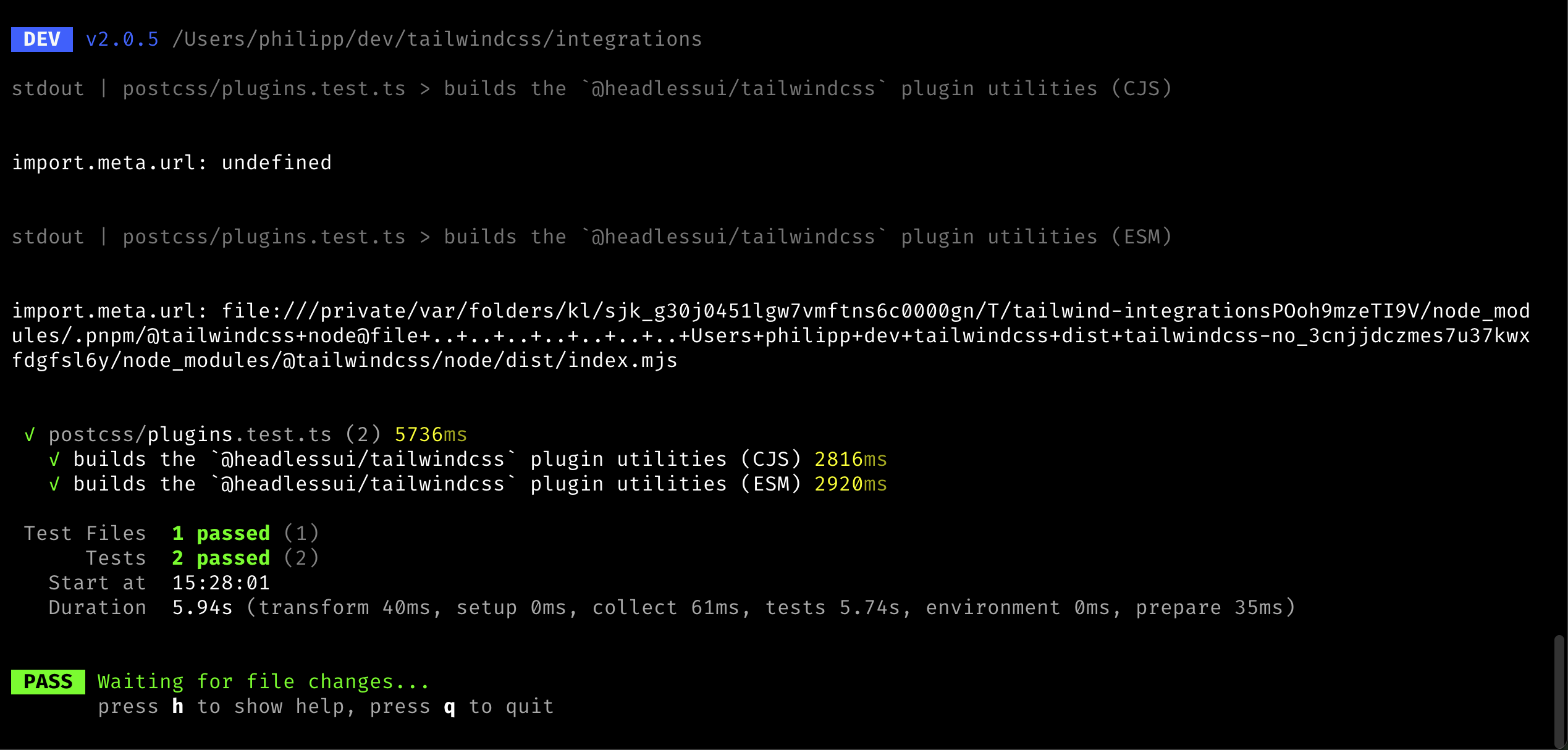
I added logging of the `import.meta.url` value to the resolver code.
When run, this was the output:
Co-authored-by: Adam Wathan <adam.wathan@gmail.com>
This PR improves the heuristics around the important codemod (e.g.
`!border` => `border!`) as we noticed a few more cases where we the
current heuristics was not enough.

Specifically, we made it not migrate the candidate in the following
conditions:

- When there's an immediate property access: `{ "foo": !border.something
+ ""}`
- When it's used as condition in the template language: `<div
v-if="something && !border"></div>` or `<div x-if="!border"></div>`

## Test plan

I added test cases to the unit tests and updated the integration test to
contain a more sophisticated example.

---------

Co-authored-by: Adam Wathan <adam.wathan@gmail.com>