mirror of
https://github.com/crawlerop/lpads
synced 2026-08-13 14:02:32 +07:00

62 lines
2.7 KiB
Markdown
62 lines
2.7 KiB
Markdown
# lpads
|
|
|
|
|
|
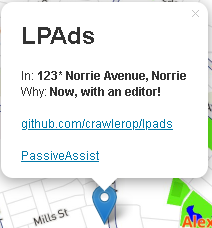
Many tools to work with Google Maps [Location Ads](https://support.google.com/maps/answer/9947218) (Norries not included.)
|
|
|
|
Maps PassiveAssist tools were now available. Click [here](https://github.com/crawlerop/psassist)
|
|
|
|
## How it works
|
|
In Google Maps, square pins are typically adverts.
|
|
Advertisers pay Google to promote these locations.
|
|
Without this feature, the project wouldn't exist.
|
|
|
|
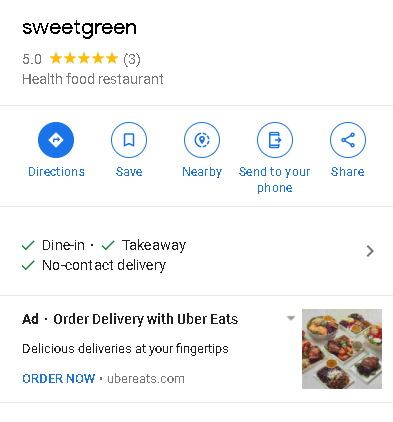
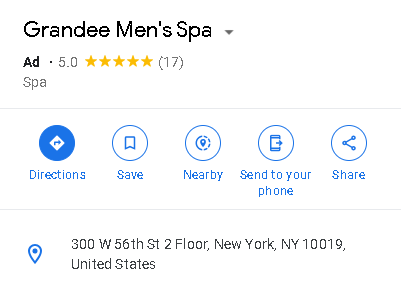
They have 2 types of ads:
|
|
|
|
|
|
|
|
With Promo
|
|
|
|
|
|
|
|
Without Promo
|
|
|
|
Purpose | Example Command
|
|
:------------------:|:----------------------------------------------------------------------------------------------:
|
|
Parse location ads | python3 locadsparser.py example.json
|
|
Find ads for location | python3 locadsgetter.py 40.7127837 -74.00594130000002
|
|
Find ads for location, outputing to file | python3 locadsgetter.py 53.679895 -1.494309 -outp promos.html
|
|
Find ads for location, using proxy | python3 locadsgetter.py 40.7127837 -74.00594130000002 -proxy YOUR_PROXY_ADDRESS
|
|
|
|
## LPAds command-line arguments
|
|
Argument | Purpose
|
|
:-----------------:|:----------------------------------------------------------:s
|
|
outp | Change output file/folder
|
|
noadsfail | Fail when no ads found
|
|
proxy | Enabling use of proxies
|
|
keepsearch | Don't fail when no ads found (for Smarty Ads and Line Ads)
|
|
|
|
|
|
## Browser Support
|
|
We also ported LPAds to JavaScript! To include in your site, add in your html file:
|
|
```
|
|
<script src="https://raw.githubusercontent.com/Crawlerop/lpads/main/lpadsjs/mapads.js" crossorigin=""></script>
|
|
```
|
|
If you want the examples, please click [here](https://crawlerop.github.io/lpads/lpadsjs/mapads_marker.html?localads=true)
|
|
We also have included the editor, please click the pencil button to start editing the ads. For advanced features, append &init=base64(script) and &event=base64(script). Where init script parameter is run on startup, and event script parameter is run on ad parsing. The typical script looks something like:
|
|
|
|
```
|
|
function (ad) {
|
|
if (ad.adName.search("eggs") != -1) {
|
|
ad.adName = "spam"
|
|
}
|
|
return ad
|
|
}
|
|
```
|
|
|
|
It only override the ad if the resulting event function is NOT null.
|
|
|
|
## Geocoder-specific features
|
|
Nominatim only: ability to parse location insertion template embedded on locational ads, enabled by appending parsetemplate=true to the navigation bar.
|
|
|
|
## Tracking
|
|
the example LPAds doesn't use any cookies that was passed into the Maps' LPAds requests, so no personalized ads will appear in this app.
|